Workflows have been migrated to Flows
From Version 11.1, Payments2Us now uses Salesforce Flow for automation instead of Workflow Rules, in line with Salesforce’s policies. If you are configuring or reviewing automation. We recommend using the Flows where applicable and for all new implementations.
- Equivalent Flows are available with the same names as the workflows (prefixed with “Payments2Us”).
- For migration steps and best practices, see: How to migrate Workflow to Flow.
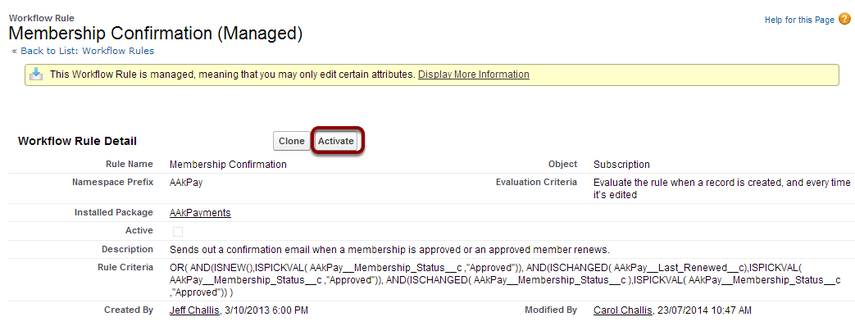
This workflow triggers the sending of a Subscriber/Membership Confirmation letter. This is used if you have a membership approval process. Once a new member is approved a confirmation letter is sent.
The same process can be applied to organisational subscriptions. Activate 'Account Membership Confirmation' instead.
Quick Steps - Contact Level memberships
- Activate workflow: Membership Confirmation
- Optionally, review the Email Template associated with the confirmation email
Quick Steps - Account Level memberships
- Activate workflow: Account Membership Confirmation
- Optionally, review the Email Template associated with the confirmation email
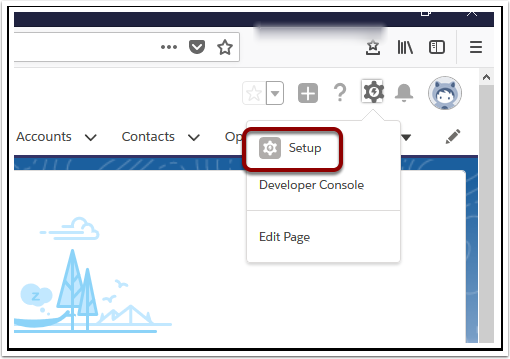
1. Open Setup
2. Search ‘Workflow Rules’

3. Read about Workflows and select ‘Continue’

This page can be turned off.
4. Use the alphabetical look-up to find ‘Membership Confirmation’

5. Select ‘Activate’