Workflows have been migrated to Flows
From Version 11.1, Payments2Us now uses Salesforce Flow for automation instead of Workflow Rules, in line with Salesforce’s policies. If you are configuring or reviewing automation. We recommend using the Flows where applicable and for all new implementations.
- Equivalent Flows are available with the same names as the workflows (prefixed with “Payments2Us”).
- For migration steps and best practices, see: How to migrate Workflow to Flow.
There can be a multiple reasons that a Recurring Payment is suspended, such as credit card has expired or a donor has requested a period to suspend their donations.
In the Payments2Us package you have the option for any outstanding payments in arrears to be paid once the Recurring Payment is active again, or to not.
Activating this workflow will stop catch up payments occuring. If inactive, then the recurring processor will charge until all payments are caught up.
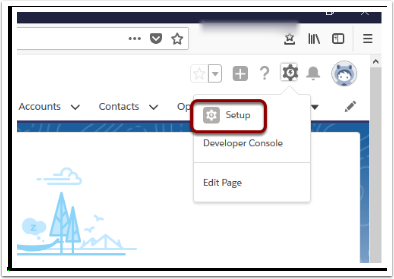
1. Open Setup
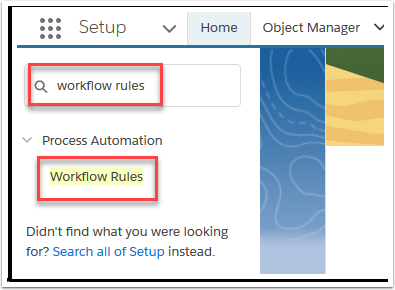
2. Search and select ‘Workflow Rules’
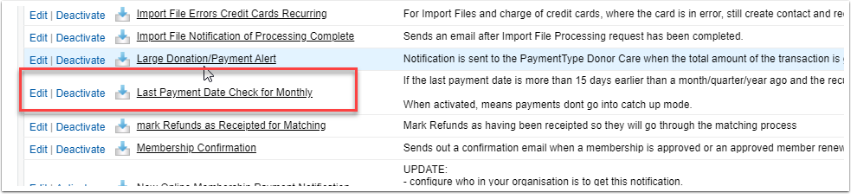
3. Use the alphabetical look-up to find 'Last Payment Date Check for Monthly', and Activate
This will update the Last Payment Date to Today and will charge on the next Regular Payment Day.
Simple put if the:
- catchup workflow is DEACTIVATED: then recurring payments WILL go into catchup mode.
- catchup workflow is ACTIVATED: then recurring payments will NOT go into catchup mode.
The Last Processed Date work in conjunction with the Next Payment Date to do catch up payments. For more details on this please see this Article.