Workflows have been migrated to Flows
From Version 11.1, Payments2Us now uses Salesforce Flow for automation instead of Workflow Rules, in line with Salesforce’s policies. If you are configuring or reviewing automation. We recommend using the Flows where applicable and for all new implementations.
- Equivalent Flows are available with the same names as the workflows (prefixed with “Payments2Us”).
- For migration steps and best practices, see: How to migrate Workflow to Flow.
Turn this workflow on if you wish to be notified of all new online payments (exception memberships).
Quick Steps:
- Locate workflow: New Online Payment Notification
- Update the recipient of the workflow email
- Enable this workflow
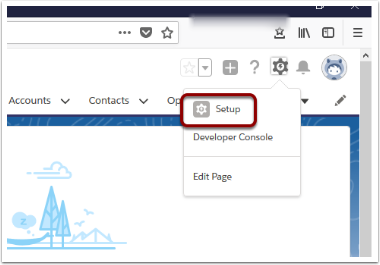
1. Open Setup
2. Search and select ‘Workflow Rules’

3. Use the alphabetical look-up to find 'New Online Payment Notification', and Activate

4. Click into the New Online Payment Notification and into the Email Alert
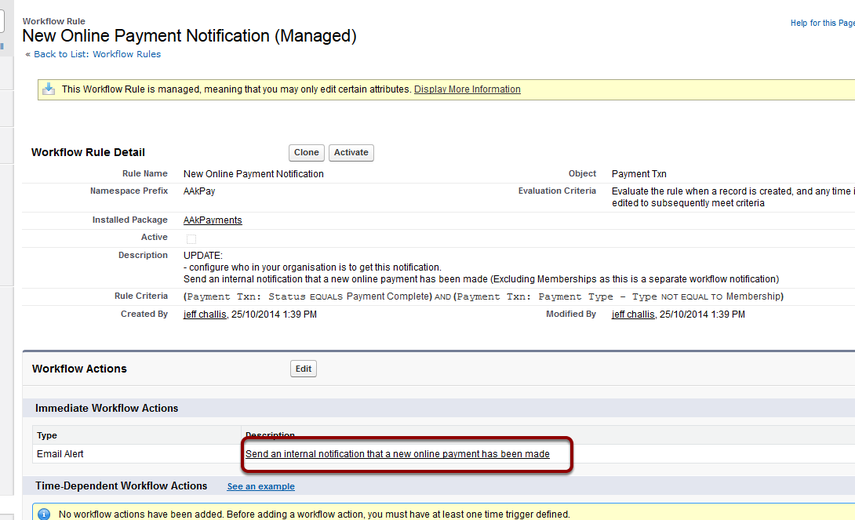
5. Edit the Email Alert - Send Send an internal notification that a new online payment has been made

6. Update the recipient(s) and Save
