If you want to tokenise the card now, but have it charged on a future date:
- Make sure the Enable Reccurring field on Payment Form selected is set to "Yes Tokenise on sign up, charge on selected day"
- Follow the procedure in the question 8 above - Don't press Update Card Details Yet
- Make sure the day of the month is not today's day eg: 25
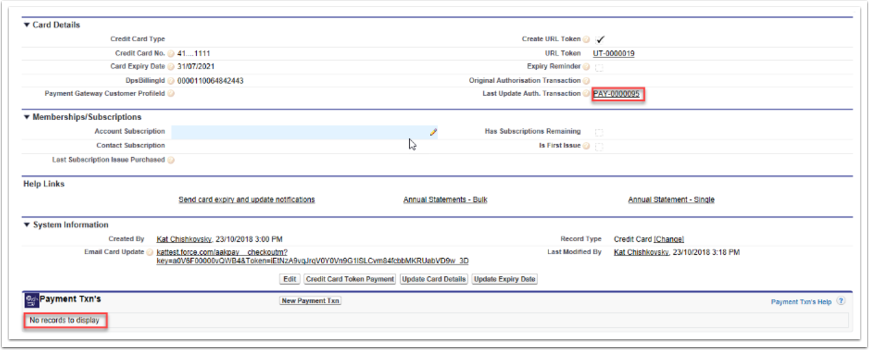
- After the Recurring Processor has run (either automatically or press Run Now), check that there is a Payment Txn in the Last Update Auth. Transaction
- Note: This Txn will not appear in the related list of Payment Txns. Actual Txns after that will appear in this list
- Note: The Auth Txn will have the status set to Auth Start. This will remain at this status, not other action is required
- Warning: In the Authorisation Txn, do not press the Authorisation Process button of you only want to have this Txn as a token on the card. Pressing this will actually charge the card the authorised amount.