Procedure How to change the email text describes how to update and clone a Visualforce email template.
When editing the Visualforce email template, there is a line that references a Visualforce component. This begins with <AAkPay:.... The component can accept a number of parameters and these are documented below.
1. Receipt PDF Component Options

Parameters that can be added are:
- AddressType - can be Mailing [Default] or Other. This determines which set of addresses / fieldsets are to be used. The fieldsets used are on the Payment Txn Object and are called "receiptMailingAddress" and "receiptOtherAddres"
- contactNa - Contact Name to use. If not specified then the related First Name and Last Name are used
- receiptLabel - It not specified, then the Receipt Label on the Merchant Facility is used
- suppressStatusUpdate - Defaults to false. If set to true, the stops the Payment Txn Status being updated to receipting complete
- letterRecordId - This is the Letter Object record id. If specified, the receipt will use the receipt text from this letter object and NOT from the Payment Txn - Receipt Letter field.
2. Subscription and Account Subscription - PDF Renewals, Confirmations Component Options

Parameters that can be added are:
- cId -Id for the Contact
- POId - Id for AAkPay__Payment_Options__c record Id
- PT - value AAkPay__Payment_Txn__c Object
- ASUB - value for the AAkPay__Account_Subscription__c Object
- SUB- value for the AAkPay__Subscription__c Object
- ROrC - RENEW (Default), CONFIRM or INVOICE to vary outputs from a renewal form to a confirmation one
- createActivity - Set to True to automatically create a related activity history
- AddressType- can be Mailing [Default] or Other. This determines which set of addresses / fieldsets are to be used. The fieldsets used are on the Payment Txn Object and are called "receiptMailingAddress" and "receiptOtherAddres"
- contactNa - Contact Name to use. If not specified then the related First Name and Last Name are used
- subject- If specified will used this value, otherwise will be based on RorC (Renewal or Confirmation)
- layoutType- GROUP (Default) has room for subscriber group items or FULL for full text body
3. Statement Component Options
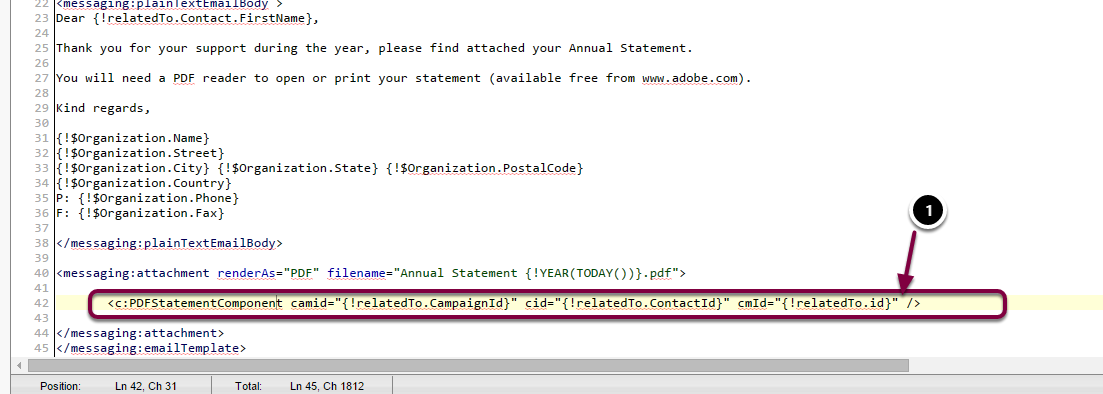
Parameters that can be added are:
- camId - record Id for Campaign Object
- cId - record Id for Contact Object
- aId - record Id for Account Object
- cmId - record Id for CampaignMember Object
- AddressType- can be Mailing [Default] or Other. This determines which set of addresses / fieldsets are to be used. The fieldsets used are on the Payment Txn Object and are called "receiptMailingAddress" and "receiptOtherAddres"
- contactNa - Contact Name to use. If not specified then the related First Name and Last Name are used
- subject - If specified will used this value, otherwise will be based on RorC (Renewal or Confirmation)
- layoutType - SUMMARY (Default) has room for printing payment transaction list; NONE is no statement text, FULL is full text body
- reportingPeriod - Date range for transaction selections. Options are: CurrentFY, PreviousFY
- createActivity - Set to True to automatically create a related activity history