If you are looking to make a form temporarily or permanently unavailable, you can use one of the following techniques.
1. If your form was published using a Full Text URL from the URL Token
If the URL looks has key=xxxx and it also includes &token=xxxx, for example looks like the one shown below, then you can copy the record id that is between key= AND &Token=. In the below example, this is a052G000011B7V2
https://payments2us-dev-ed.my.salesforce-sites.com/paynow/aakpay__checkoutm?key=a052G000011B7V2&Token=5xutXXBTgjtKEwBlXPki2beVJohUUkU1sKdik113ONc_3D
Whilst logged into Salesforce, you can then paste this after the .salesforce.com/ in your URL and then press enter. As shown in the screenshot below.
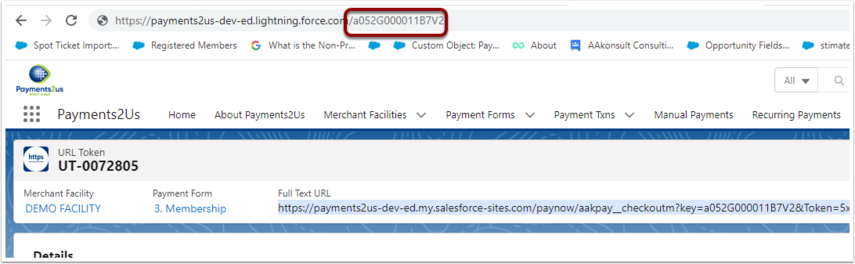
After locating this URL Token record, you can then delete it.
2. If your form was published using a Short URL from the URL Token
If the URL has /U/ in it then you are using the short URL. For example the one shown below.
https://payments2us-dev-ed.my.salesforce-sites.com/paynow/U/G000011B7V2F
Copy the value after /U/ and then paste this into the search box in Salesforce. In the above example, this is "G000011B7V2F"

This will locate the URL Token used.
You can then either:
- Remove the URL Token
- Or, update the "Tiny Token" value to something that is different, eg. "Invalid" (Note: you may need to edit the page layout and change this to an editable field)